
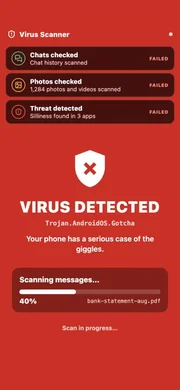

Fake Virus Scan
The fake virus scan prank opens on a calm, believable antivirus dashboard — "your device is protected", nothing to do. Then they run a scan themselves, and it slowly stops being fine: threats appear one at a time, the interface turns red, quarantine gets to 99% and fails.
This is the slow version of a scare screen. The fake virus alert flashes a warning the second it opens and reads as theatrical on purpose; this one behaves like real software, which is why it works so much better on a device you have just handed over. They pressed Scan. You did nothing.
As a computer prank it works on anything with a browser — a laptop, a desktop PC, a tablet or a phone. There is no download and nothing to install, so the whole thing is a computer prank screen and nothing more.
How It Works
- Pick an intensity, a start delay and an automatic reveal, then hit Launch. The delay gives you time to hand the device over and walk away.
- The screen opens on a calm security dashboard reading “Your device is protected”. Whoever is holding it picks Quick scan or Full system scan — that choice is what sells it, because they started it themselves.
- Counters climb, file paths stream past and a live threat graph moves. Then the first detection lands and the whole interface shifts to a warning state.
- By the third threat it goes critical — the dashboard turns red, an unknown encrypted connection appears on the network monitor, and notifications start stacking up.
- Hitting Quarantine threats runs a five-stage cleanup that gets to 99% and then fails. On Maximum, the screen is taken over entirely.
- Press Esc to reveal it, or let the automatic reveal do it for you.
What Makes This One Different
The fake virus alert is a single flashing screen — loud, immediate and obviously theatrical. This one is the slow version. It behaves like software: it asks permission, reports progress, offers actions that appear to work, and only loses control gradually. Nothing jumps out. It just stops being fine.
That is also why it reads as more convincing on a handed-over device. The person is not shown something alarming, they are the one who pressed Scan.
Three Intensity Levels
- Believable — fewer threats, slower escalation, no screen takeover. The one to use on somebody you do not know well.
- Scary — the default. Full escalation to critical, a failed quarantine, and a takeover only if they try to restart protection.
- Maximum — more threats, faster, and a full-screen DEVICE COMPROMISED takeover after the quarantine fails.
Where It Works
Anything with a browser. On a desktop or a laptop it is the most convincing, because the layout is genuinely what security software looks like on a big screen — a sidebar, a dashboard and a progress ring. As a laptop prank screen, press F11 first so there is no browser chrome to give it away.
On a phone or tablet the sidebar drops away and the dashboard fills the screen, which reads more like a mobile security app. The threat locations change to match — photos, messages, saved credentials — rather than folders and drives.
For the best results, add it to the device's home screen first. It then opens with no browser bar at all, which removes the last thing that would give it away.
Funny Computer Pranks That Break Nothing
The best computer pranks share one property: they look expensive and cost nothing. This one never touches a file, so it cannot be a broken computer prank in any literal sense — the only thing that happens is a web page drawing an animation.
That matters more than it sounds. A pc prank that installs something, changes a setting or hides a file stops being a joke the moment somebody has to undo it, and on a work machine it can become a genuine IT incident. Everything here ends when the tab closes.
If you want more in the same family: the blue screen of death implies damage rather than intrusion, fake Windows update is the slow-torture option, and fake broken screen is the one that gets a genuine gasp because the damage looks physical.
Use It Responsibly
Only on your own device, or one you have permission to use. Never use it to ask for money, passwords or access to anything — that is where a prank stops being a prank. Reveal it quickly, and keep it away from workplaces, public machines and anyone who would find it genuinely distressing rather than funny.
Nothing is scanned, downloaded, installed or accessed. It is a web page with an animation on it, and closing the tab ends it completely.
Frequently asked questions
Is this a real virus scan?
No. Nothing is scanned, downloaded, installed or accessed. It is a web page with an animation on it — the file counts, paths and threat names are all invented, and closing the tab ends it completely.
How is this different from the fake virus alert?
The fake virus alert is one flashing screen that fires immediately. This is a full antivirus app that escalates over a minute or two — the person starts the scan themselves, which is what makes it land.
What do the intensity levels do?
Believable finds fewer threats, escalates slowly and never takes over the screen. Scary is the default, with a full critical state and a failed quarantine. Maximum adds more threats, moves faster, and ends in a fullscreen takeover.
How do I stop it?
Press Esc on a desktop, or hold the bottom-left corner of the screen for three seconds on a phone or tablet. You can also set an automatic reveal before you launch, so it ends on its own after 60, 90 or 120 seconds.
Can I set it up before handing the device over?
Yes — that is what the start delay is for. Pick 30 seconds or a minute, hit launch, hand the device over and walk away. Copy configured link saves your settings into the URL so it opens the same way for whoever you send it to.
Is it safe to use on someone?
The page is harmless, but the framing matters. Never use it to make someone believe they must pay, hand over a password, or let you "fix" their machine. Keep it away from work equipment, where IT may treat it as a genuine security incident.