Fake Call
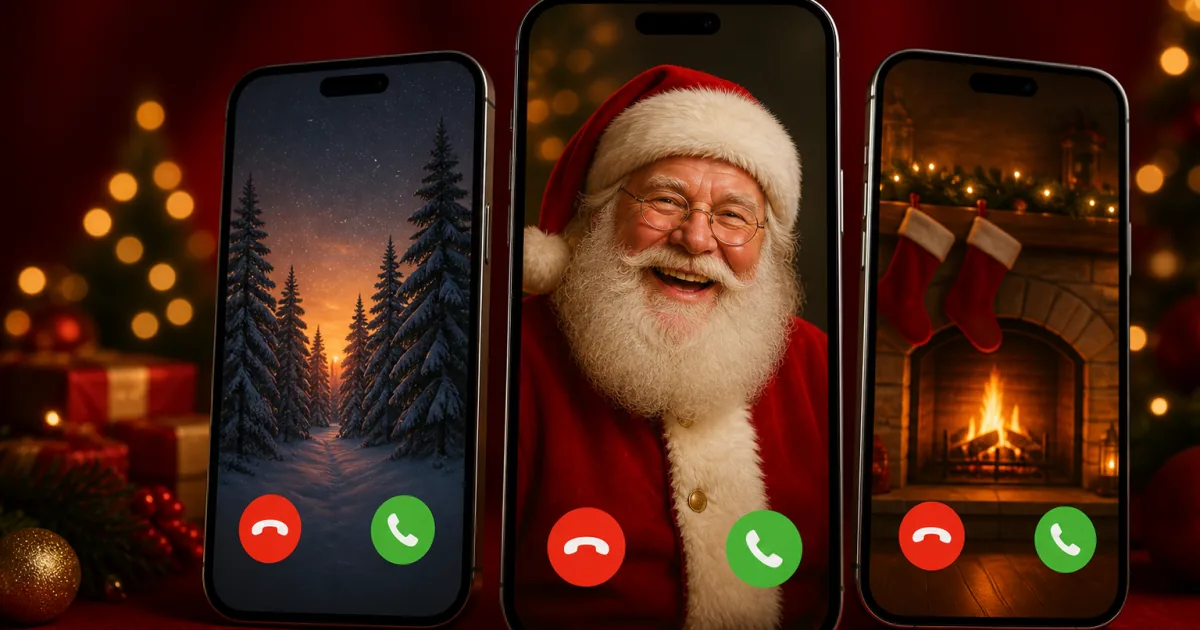
Set up a fake incoming call and put your phone down — it rings like the real thing. Choose who's "calling", pick iPhone or Android, and get a harmless fake call screen with ringtone and vibrate. No real call, no app, totally free.
Preview
This is what they’ll see. Upload a wallpaper to drag it into place.
Tip: if you hear nothing, check your phone isn’t on silent — older iPhones mute the ringtone from the side switch.
Stuck for a caller or a moment? Read the fake call prank ideas guide — 25 ideas, the excuse call, and how to make a fake phone call look real.
For the best results, add this to the device's home screen — the call then opens with no address bar or tabs, the ringtone gets past the silent switch, and the screen will not dim while it waits.
How the Fake Call Works
For laughs only. This never places a real call — it just shows a fake call screen on your own phone. Keep it kind: use it to set up a funny excuse to leave, not to genuinely scare or deceive anyone into a real emergency.
What is a fake call?
A fake call is a realistic incoming-call screen you trigger on your own phone — the "caller" isn't real and no actual call is ever placed. You pick the caller's name and number, choose how long until it "rings," then put the phone down and let it go off with a real ringtone and vibration. It's free, needs no app, and the photo you add never leaves your device.
What can you use a fake call for?
- The great escape — set it to ring in a few minutes to bail out of a boring meeting, an awkward date, or a conversation that won't end.
- A prank — make it look like "Unknown," the boss, or a celebrity is calling, hand someone your phone, and watch them react. It's a favourite April Fools' prank.
- A safety move — a well-timed fake call is a classic way to check in with yourself and leave somewhere that doesn't feel right.
Is a fake call app safe — and is it a real call?
It's completely safe and it is not a real call. Nothing is dialled, no number is contacted and you're never charged — the tool simply draws a convincing iPhone or Android call screen over the home screen. It's the harmless cousin of a prank call: for where the line actually is on real calls, see is prank calling illegal?
Set the call background wallpaper
Most fake call screens give themselves away on the background. This one lets you set a proper call background: pick from 45 wallpapers — real-looking people, funny animals and plain scenic backgrounds — or upload your own photo, then drag it into place and zoom until it sits right. The preview shows the exact crop before you start, so what you see is what appears when it rings.
Samsung phones have a built-in call background setting, and iPhones let you set a full-screen contact poster, but both only work for people already saved in your contacts. This is the opposite: nothing is saved, nothing is dialled, and the incoming caller wallpaper is whatever you choose in the browser. If you just want a good phone call background wallpaper to keep, every template is a full-resolution image you can save and use anywhere.
Your own uploads never leave the device — the photo is held in the browser tab and is never sent anywhere.
How to make the fake call believable
For the best results, add this page to the device's home screen first. Launched from there it opens with no address bar, no tabs and no URL — the single biggest thing that separates “that's a website” from a call screen nobody questions. It also lets the ringtone through on a phone set to silent, and stops the screen dimming while you wait for it to ring.
Then add a real-looking name and number, pick a wallpaper, match the phone style (iPhone or Android) to the device you're holding, and give yourself a short delay so the "call" arrives naturally. Want to sell it even harder? Follow up with a fake text message from the same "caller," or set the scene with a fake broken screen or a prank page. New to all this? Start with what makes a good prank.
Fake Call FAQ
Does this make a real phone call?
No. Nothing is dialled and no real call is ever placed — it only shows a realistic fake incoming-call screen on the device you open it on. It is a harmless visual gag, completely safe and free.
How do I use the fake call?
Set the caller name, number and photo, choose iPhone or Android, pick how long until it "rings", then tap Start. Put the phone down and it will show an incoming call after the delay — answer it for a fake conversation or let it ring.
Can I make it look like a specific person is calling?
Yes — type any caller name and number and add a photo from your device. The photo stays on your phone (it is never uploaded), so it is private.
Does it play a ringtone and vibrate?
Yes — the fake call rings and vibrates like a real one, and starting the call is enough to enable the sound. If you hear nothing, check the phone is not on silent: older iPhones mute the ringtone from the side switch.
Do I need a fake call app for Android or iPhone?
No. This runs in the browser on both, so there is no fake call app to install and nothing to give permissions to.
How do I get rid of the address bar so it looks real?
Add the page to the device's home screen and launch it from there. It then opens with no address bar, no tabs and no URL at all, which is the difference between something that reads as a website and a call screen nobody questions. It also gets the ringtone past the silent switch and keeps the screen awake while it waits.
Can I fake a call from jail, or a fake FaceTime call prank?
Yes — the caller name, number and photo are all free text, so a fake jail phone call or a fake FaceTime call prank is just a matter of what you type in. Nothing is dialled either way; it is a screen, not a call.
Can I set a call background on Samsung?
The Samsung call background setting (Phone app → Settings → Call background) shows a photo or video during a call, but it only applies to contacts already saved on the phone and it affects real calls. This tool is a prank screen instead: choose one of the 45 call background wallpapers or upload your own photo, drag it into place, and it appears behind the fake incoming call. Nothing is saved to your phone and no real call is involved.
Can I use my own photo as the incoming caller wallpaper?
Yes. Tap Upload Your Own under Wallpaper, then drag inside the preview to reposition it and use the zoom slider to crop it. The preview shows the exact crop before the call starts. Your photo stays in the browser on your device and is never uploaded.
Where can I get a good phone call background wallpaper?
All 45 templates here are free to use — people, funny animals and plain scenic backgrounds, all full resolution and sized for a phone screen. Open the wallpaper picker to browse them by category. They work as an ordinary phone wallpaper too, not just inside the prank.
How do I get out of the fake call?
Tap Decline or End Call, or press Esc on a computer, and it closes instantly back to the setup screen.
Is it free and private?
Completely free, no sign-up and no app. Everything runs in your browser and the photo you add never leaves your device.